Today's Quote: "If you are a good team, your offense is born on the defensive end." - Don Meyer
Today's Theme...Double Drag Screen Actions
The double drag screen is popular with many fast-breaking teams, as a way to quickly get into a high pick and roll before the defense is set. You can run this with your secondary break.
This works well because in the transition chaos, the defense is preoccupied with stopping the ball, protecting the basket, and finding the 3-point shooters. They are not in position to use their usual pick and roll defensive tactics - trapping, hedging, blitzing, icing - so the pick and roll action works.
You can also run a single drag screen, but here we'll discuss the double drag, since there are so many options.
There are two entry options. There is the "Drag" entry where the ball-handler speed-dribbles the ball across half-court, and the "Hit Ahead" entry where the ball is passed ahead to a wing, and the wing player receives the double drag screens.
There are options based on how the screens are set. A screen may be a typical hard, set screen, making firm contact with the defender. Or the screen might be a light, brush or "ghost screen" with little or no contact. The latter is a way of changing the tempo, speeding things up, while the first is more deliberate.
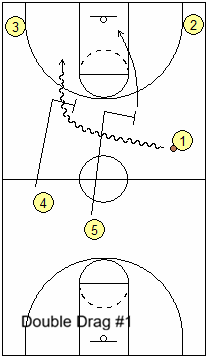
There are options based on what the screeners do after screening. In a typical "normal" double drag screen (diagram #1 below), the first screener rolls to the hoop while the second screener pops out to the arc. But either screener might slip inside instead of screening.
"Drag" entry. In diagram 1, O2 and O3 sprint deep to the corners. O5 and O4 set firm double drag screens for O1. O5 rolls to the hoop, while O4 pops outside. O1 has many options... jump-shot, dribble-drive, pass to O5 inside, or to O3 or the safety O4 for 3-point shots. O1 might even reject the screens entirely and attack the open lane straight to the basket. You can also add a Spain pick and roll option to the basic double drag by having O2 back-screen for the roller O5.
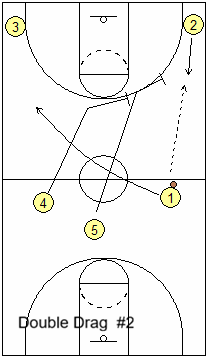
"Hit Ahead" entry. Diagram #2 below shows O1 passing up the sideline to O2 at the wing. O5 and O4 set firm double drag screens for O2 for the pick and roll. "Hit ahead" changes the angle of attack, is quicker and might surprise and catch the defense off-guard.
By changing the options, you can change the tempo. The "drag" option, while still uptempo, is more deliberate. By using the "hit ahead" entry, or a ghost screen and slip option (discussed in the article), you can speed things up. The double drag screen is a good way to keep the defense off-balance and guessing.
Coach's Clipboard Premium Membership - join today! Immediate online access, comprehensive downloadable playbook included with offenses, defenses, plays, drills, coaching and player tips, animated diagrams, video clips, mobile-ready, pdfs for print-outs, and more!
Coaches... get a group membership (deeply discounted) for all your coaches!
For a new featured article every day - follow:
Email: hostmaster@coachesclipboard.net
Coach's Clipboard, US copyright, 2026, James A. Gels
Coach's Clipboard, Box 126, Charlevoix, MI 49720