From the Coach's Clipboard Basketball Playbook
Disclosure: This page contains affiliate links, which means that Coach's Clipboard receives a small commission (at no cost to you) if you make a purchase using these links.
The drag-screen and double drag screen are parts of transition offense and are important in the Pace and Space offense, and any fast-paced uptempo offense. Players sprint up the court and either one post player can drag-screen, or two post players can double-drag screen immediately and set a high ball-screen with pick and roll action.This works well because in the transition freelance chaos, the defense is usually preoccupied with stopping the ball, protecting the basket, and finding the 3-point shooters. They are not in position to use their usual pick and roll defensive tactics - like trapping, hedging, blitzing, icing - so the pick and roll action works better.
Drag Screen
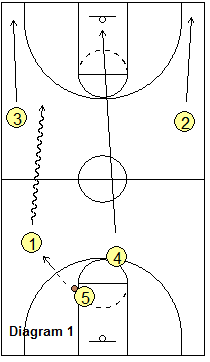
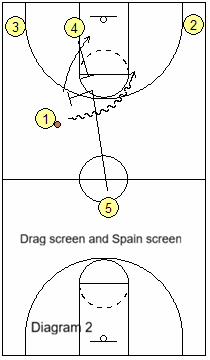
First we'll discuss the drag-screen which uses just one post drag screener. This action comes from the Fred Hoiberg article on transition attack. In diagram 1, after securing the rebound, the wings O2 and O3 run wide to the corners. O4 (or the post who does not get the rebound), "rim runs" to the hoop and eventually to the left block area. O1 receives the outlet pass from O5. O1 speed dribbles up the left side, as O5 sprints up as the trailer.In diagram 2, O5 sets the "drag-screen" for O1. This screen is set near the sideline or slot, at the 3-point arc. O5 can roll to the hoop, or pop to the arc as O1 attacks. If O5 rolls to the hoop, O4 could optionally set a Spain pick and roll back-screen for O5, or instead just slide to the short corner for spacing (with O3 lifting to the wing).
See this video clip from Coach Hoiberg's DVD:
First, there are two entry options. There is the "Drag" entry where the ball-handler dribbles the ball across half-court and into the double drag screen. And there is the "Hit Ahead" entry where the ball is passed ahead to a wing, and the wing player receives the double drag screens at the wing.
There are options that have to do with how the screens are set. A screen may be a typical hard, set screen, making firm contact with the defender. Or the screen might be a light, brush or ghost screen with little or no contact. The latter is a way of changing the tempo, speeding things up, while the first is more deliberate.
And there are options based on what the two screeners do after screening. In a typical "normal" double drag screen (diagram #1 below), the first screener rolls to the hoop while the second screener pops out to the arc. But either screener might slip inside instead of screening.
Diagram #1 below shows O1 has dribbled across half-court (drag entry), and O5 and O4 set hard, firm double drag screens for O1. The first screener O5 rolls to the hoop, while O4 pops outside. O1 has many options... jump-shot, dribble-drive, pass to O5 inside, or to O3 or the safety O4 for 3-point shots. O1 might even reject the screens entirely and attack the open lane straight to the basket.
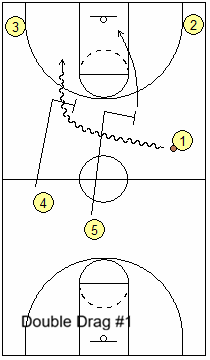
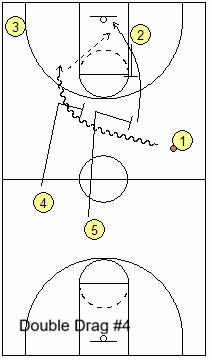
Diagram #4 above shows another option. O2 sets a Spain back-screen for the roller O5.
By changing the options and the tempo, the double drag screen is a good way to keep the defense off-balance and guessing. Speed up the tempo with either the "hit ahead" entry, or the ghost screen and slip.
Double Drag Screen
The double drag screen is popular with many fast-breaking teams, as a way to quickly get into a high pick and roll before the defense is set. Again, O2 and O3 sprint to the corners. There are a number of double drag screen options.First, there are two entry options. There is the "Drag" entry where the ball-handler dribbles the ball across half-court and into the double drag screen. And there is the "Hit Ahead" entry where the ball is passed ahead to a wing, and the wing player receives the double drag screens at the wing.
There are options that have to do with how the screens are set. A screen may be a typical hard, set screen, making firm contact with the defender. Or the screen might be a light, brush or ghost screen with little or no contact. The latter is a way of changing the tempo, speeding things up, while the first is more deliberate.
And there are options based on what the two screeners do after screening. In a typical "normal" double drag screen (diagram #1 below), the first screener rolls to the hoop while the second screener pops out to the arc. But either screener might slip inside instead of screening.
Diagram #1 below shows O1 has dribbled across half-court (drag entry), and O5 and O4 set hard, firm double drag screens for O1. The first screener O5 rolls to the hoop, while O4 pops outside. O1 has many options... jump-shot, dribble-drive, pass to O5 inside, or to O3 or the safety O4 for 3-point shots. O1 might even reject the screens entirely and attack the open lane straight to the basket.
Diagram #4 above shows another option. O2 sets a Spain back-screen for the roller O5.
Hit Ahead Double Drag Screen
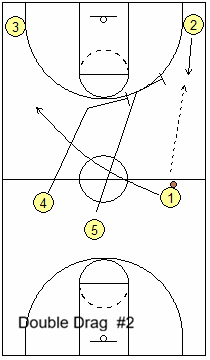
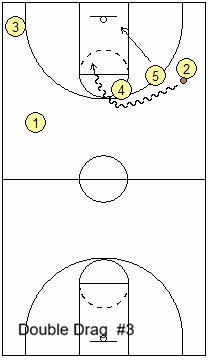
Diagram #2 below shows O1 passing up the sideline to O2 at the wing ("hit ahead" entry). O5 and O4 set firm double drag screens for O2 on the wing, and O2 executes the pick and roll (diagram #3). O5 rolls inside as O4 pops outside. Notice that O1 sprints to the left wing. The "hit ahead" changes the angle of attack and is quicker and might surprise and catch the defense off-guard. Ghost and Slip Double Drag Screen
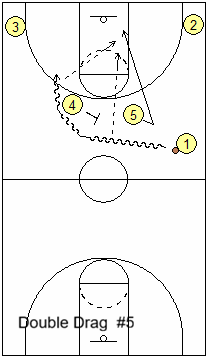
Diagram #5 below shows a typical drag entry double drag screen for O1. But here O5 does NOT make hard contact, but instead ghost screens (no contact with defender), and quickly back-cuts and slips inside for the pass from O1. This is a more uptempo version of the double drag screen. If the initial pass to O5 is not open, O1 runs the pick and roll with O4.By changing the options and the tempo, the double drag screen is a good way to keep the defense off-balance and guessing. Speed up the tempo with either the "hit ahead" entry, or the ghost screen and slip.
"Double Drag Screen" from Coach Hoiberg's DVD: "
Transition Basketball with Six Secondary Break Sets"
Related pages:
Want More Coaching Content?
Get access to more complete articles, diagrams, and coaching tools with Premium Membership.
View Membership Options


