From the Coach's Clipboard Basketball Playbook
Basketball offenses use court alignments such as 5-out, 4-out, 3-2, 1-4, Horns, Box, and Stack to establish spacing and organize player movement. Within those structures, coaches teach cuts, screens, handoffs, and defensive reads, often combining them into set plays or a motion offense.This page focuses on those individual actions—the building blocks of an offense. It serves as a reference library of both traditional and modern actions that coaches can adapt to many offensive schemes. Choose a few that fit your players, teach the reads and counters, and help players connect actions as the possession develops. Set plays still have an important role, especially for inbounding, after a time-out, or in last-seconds situations.
A play organizes a sequence. An action seeks to create an advantage. Teach players the action, the defensive read, and what comes next. Their usefulness depends on spacing, personnel, and whether the defense is playing man-to-man or zone.
For example, a scripted play might tell a player: "Come off the corner down screen and catch and shoot on the wing."
Teaching this action adds decisions:
- If the defender trails, curl inside.
- If the defender takes away the route over the screen, back-cut.
- If the defense switches, look for the screener's slip or seal.
Start Small: Choosing and Teaching Your Actions
But is learning actions a more difficult, more time consuming way of learning? Yes, it can be—especially at first. Learning where to go in a fixed play is usually easier than recognizing the defense and choosing the right response.An offense built around actions asks players to learn the movement, its timing, the defensive reads, and how to continue afterward. With inexperienced players or limited practice time, that can be a lot to absorb. A large menu of actions would make it even harder.
But scripted plays also require reads once the defense takes away the first option. Remembering a play is easier; executing it successfully against defense isn't necessarily easier.
Recommendation: Start with two or three actions, each with one primary option and one counter.
For example, start with pass-and-cut, pick-and-roll, and one complementary action such as Zoom. Teach each in small-sided games against defenders, then teach players how to flow into another action when the first produces no advantage. Add counters before adding more actions. Introduce these concepts in middle school and reinforce them through the freshman and JV levels, so players arrive on varsity with familiar actions and well-practiced reads.
The Offensive Action Library
The actions below are grouped by how they create scoring opportunities. Some combine several movements and could fit in more than one category. Choose actions that complement each other and fit your players.1. Passing, Cutting, and Exchanges
These actions use passing and movement to create separation, attack overplaying defenders, and open driving lanes.- Give-and-Go / Pass-and-Cut: Pass to a teammate and cut toward the basket. Read whether the defender follows the cutter or turns toward the ball. Pass and cut is an important part of the Read and React offense (and most motion offenses).
- Backdoor Cut: Cut behind a defender who denies the pass or overplays the perimeter.
- Dribble-At: Dribble toward a teammate to initiate a backdoor cut or handoff, according to your team's rules and the defender's position.
- Dribble Handoff (DHO): Hand the ball to a teammate moving past you, using your position to help separate the receiver from the defender. Read the drive, shot, and return pass.
- Get Action: Pass to a teammate and immediately follow the pass to receive a handoff.
- Fake Handoff / Keeper: Show the handoff, then keep the ball and attack when the defense commits to the receiver.
2. Off-Ball Screening Actions
These actions free players to receive the ball, cut to the basket, or move into another action. Teach both the receiver's reads and the screener's opportunities to slip or seal.- Screen Away: After passing, screen for a teammate away from the ball.
- Down-Screen / Pin-Down: Screen for a teammate below you, allowing that player to come toward the perimeter. Depending on the defender's position, the receiver can come straight off, curl, fade, or back-cut.
- Back-Screen: Screen behind a teammate's defender to free a cut toward the basket.
- Flare Screen: Screen for a perimeter teammate moving away from the ball toward open shooting space.
- Cross Screen / Post-to-Post Screen: Screen across the lane to free a teammate for an inside post feed.
- UCLA Screen and Cut: After passing to the wing, cut toward the basket off a screen near the high post.
- Flex Screen and Cut: Use a baseline cross screen to free a cutter coming from the opposite side toward the basket.
- Staggered Screens: Two teammates set successive off-ball screens for the same receiver.
- Screen-the-Screener (STS): A player sets a screen, then receives a screen from another teammate.
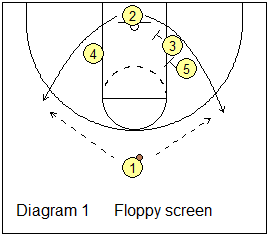
- Floppy Action: A player starts near the basket and chooses an exit toward either wing using the available down-screens.
3. Ball-Screen Actions and Variations
Ball screens create opportunities for the ballhandler and screener while forcing the other defenders to make help decisions. Spacing around the action is as important as the screen itself.- Pick-and-Roll: Set a ball screen, then roll toward the basket. The ballhandler reads the drive, roller, and help defenders.
- Pick-and-Pop: Set a ball screen, then move into open shooting space.
- Slip: A great counter action when the defense anticipates the screen or commits to a switch - leave the screening position early and cut toward the basket.
- Ghost Screen: A fake screen action - approach as if setting a ball screen, then leave without contact, usually moving to open perimeter space.
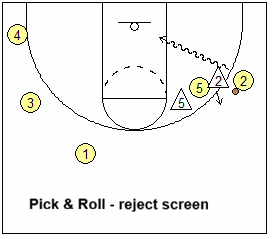
- Reject the Screen: When the defender overplays the screen, the ballhandler rejects the screen entirely and attacks away from the screen on a straight-line to the basket.
- Re-Screen / Flip the Screen / Twist: Change the screening angle and screen again when the defense contains the first attack.
- Empty Corner Pick-and-Roll: Clear the ball-side corner to remove the nearby corner defender's help on the drive and roll. Especially helpful on side (wing) ball-screen action.
- Drag Screen: A trailing player sets a ball screen in transition or early offense.
- Double Drag: Two trailing players set consecutive ball screens, commonly with one popping and the other rolling.
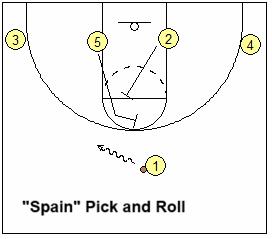
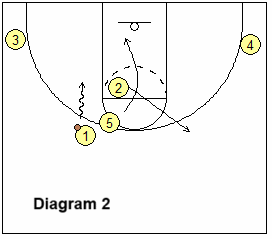
- Spain Pick-and-Roll: Add a third player who back-screens the rolling screener's defender, then usually moves out to the perimeter.
4. Connecting Actions
Connected actions put a second decision in front of the defense. Timing matters: the next movement should build on the first action while preserving useful spacing.- Zoom / Chicago Action: A player comes off a pin-down directly into a handoff. The action can continue into a ball screen.
Read: player may reject corner pin-down and cut to basket if his defender is over-playing. - Ram Action: Screen for a teammate who then moves into a ball screen. The Ram screen delays the ball screener's defender and makes it harder for the defense to blitz, hard hedge or trap the ball-screen.
Reads: If the defense switches the ram screen, the ram-screener can slip and shape up in the paint for a pass. If the defense jumps out early on the ball-screen, the ball-screener slips the screen and cuts inside. - Veer Action: After setting or showing a ball screen, screen away for another teammate. This helps open up a good shooter.
Reads: If O2's (the corner player) defender tries to chase over/around the veer screen, O2 reads this and curls inside for the pass and shot. If the defenders overplay or switch the veer screen, the screener slips to the hoop. - Handoff into a Ball Screen: Continue a handoff with a ball screen if the receiver has not gained an advantage.
Read: If the defender overplays and denies the hand-off cut, the cutter back-cuts to the hoop for the pass. - Ram into Veer: Free the ball screener with a Ram screen, then have that screener screen away (veer screen) after the ball-screen action.
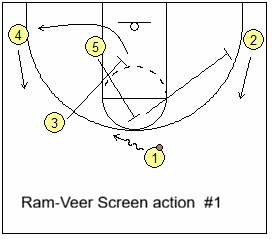
O3 starts the action (below), setting a Ram screen for O5. After screening, O3 clears out to the left corner, as O4 lifts. O5 ball-screens for O1, and then Veer screens for O2 (good shooter). O1 reads the drive or pull-up shot, the pass to O2 coming off the Veer screen, and any opening created by defensive help.
Reads: Either O3 or O5 could slip their screens if the defenders are over-playing or switching the screen. O2 has the option to curl inside if X2 is chasing over the veer screen. O1 reads the defense and drives, shoots, or passes to an open teammate.
- Ghost into Veer: Show (fake) a ball screen, then move into an off-ball veer screen for a teammate.
Reads: Use the same curl and screener-slip reads described under Veer Action above. - Double Drag into Spain: Combine consecutive ball screens with a Spain back screen for the rolling screener's defender.
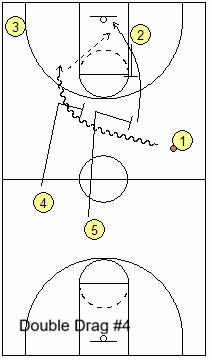
O1 dribbles across half-court (below), and O5 and O4 set double drag screens for O1. The first screener O5 rolls, while O4 pops. O2 back-screens O5's defender as O5 rolls.
Reads: O1 has all the usual pick and roll options... jump-shot, dribble-drive, pass to roller, popper or kick-out. O1 might even reject the screens entirely and attack the open lane straight to the basket. If the back screen delays O5's defender and opens the roll, pass to O5. If a perimeter defender helps on the roller, find the open shooter.
- Hit-Ahead into Double Drag: Pass ahead to a wing and have the trailing screeners initiate the double drag for that receiver.
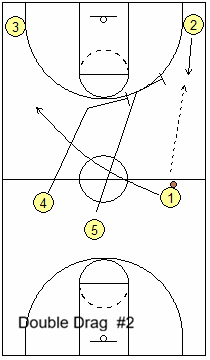
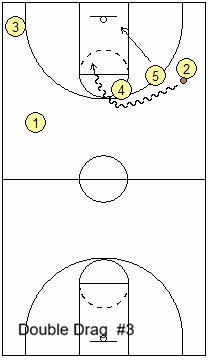
O1 passes up the sideline to O2 ("hit ahead" entry). O5 and O4 set double drag screens for O2 on the wing, and O2 executes the pick and roll. O5 rolls inside as O4 pops outside. The "hit ahead" changes the angle of attack and is quicker and might surprise and catch the defense off-guard.
Reads: O2 reads the pick and roll options... jump-shot, dribble-drive, pass to roller, popper or kick-out. O2 could reject the screens entirely and attack the open lane straight to the basket. If both defenders commit to O2, find the open roller or popper. If a weakside defender helps inside, look for the kick-out.
5. Playing Out of the Advantage
Creating an opening is only the beginning. Players must recognize it quickly, while teammates maintain passing options and respond to help.- Catch-and-Shoot: Be ready to shoot when the catch provides an open shot within your range.
- Attack the Closeout: Drive past a defender closing out hard or off balance.
- Drive-and-Kick: Attack the lane and pass to the teammate whose defender commits to help.
- Drift: Slide to the corner or along the baseline to maintain a passing window as the ballhandler penetrates.
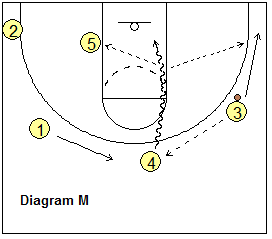
- Lift: Move up from the corner toward the wing when that movement creates a better passing angle.
- Fill Behind ("Safety"): Move into space behind the driving player to provide a return-pass option.
- Cut Behind Help: Cut into open space when your defender turns or moves away to help on the ball.
- Extra Pass: Move the ball to a teammate with a better opportunity before the defense recovers.
Related page:
Want More Coaching Content?
Get access to more complete articles, diagrams, and coaching tools with Premium Membership.
View Membership Options


