From the Coach's Clipboard Basketball Playbook
The Ram and Veer screen actions are relatively new ways of getting players open. They are ancillary actions that make other offensive actions work better and harder to defend.
Ram screen action
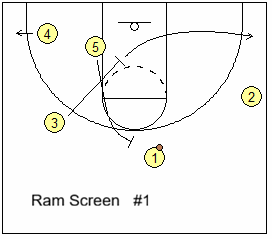
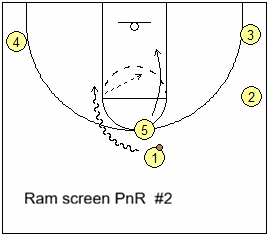
The ram screen is used before a ball-screen, set usually as a pindown-screen for the ball screener. Defenses are getting good at defending the high pick and roll by trapping, hedging, or blitzing. The Ram action impedes the post defender from chasing the post ball-screener to the top, and this interferes with the defense's ability to blitz, hard hedge or trap the ball-screen. Thus the Ram screen is basically a preparation before the ball screen.Diagram 1 below shows O3 setting a ram screen on O5's defender, freeing O5 to sprint up to ball-screen for O1. A key is the screener must sprint to the ball-screen - if he/she just jogs up, the defender can catch up and the ram screen is pointless. After screening, O3 clears to the right corner (diagram 2) and the pick and roll ensues... O1 attacks and O5 rolls or pops.
Slip options:
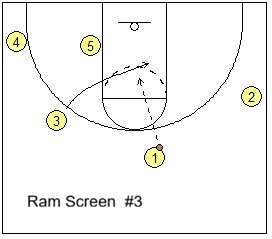
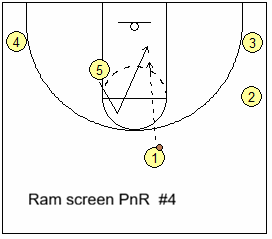
Both O3 and O5 can slip their screens. Diagram 3 below shows O3 faking the ram screen, but instead shaping up in the paint for a quick pass from O1 and a shot. This is a good counter if the defense switches the ram screenDiagram 4 shows that after the O3 ram screen, O5 sprints up, but quickly back-cuts, slipping the ball-screen for a pass from O1. This is a good counter if the defense jumps out early on the ball-screen.
So again, the ram screen is nothing but a simple down-screen that makes the pick and roll action work better.
Veer screen action
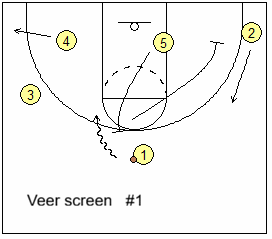
A Veer screen occurs after the screener initially ball-screens, or fakes a ball-screen ("ghost screen"). But instead of rolling or popping, he/she sets another screen. He/she "veers" over to screen for another teammate, often a pindown screen. Maybe your ball-screener O5 is neither a good finisher or shooter. His/her Veer screen can free up a teammate who can shoot.A Veer screen can also follow a ghost screen where the screener fakes a ball-screen, but makes no contact and then Veer screens away.
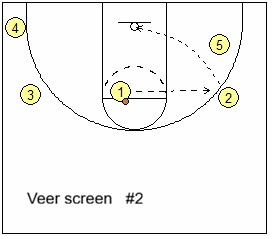
Diagram 1 below shows O5 setting a ball-screen for O1, but instead of rolling or popping, Veer screens for O2 (your best shooter). O2 cuts to the wing for a pass and shot (diagram 2). This Veer action puts pressure on the help defender: if O2’s defender moves toward the lane to help on O1's drive, the Veer pin-down can free O2.
Veer options:
Diagram 3 below shows the curl option. If O2's defender tries to chase over O5's Veer screen, O2 reads this and curls inside for the pass and shot.Diagram 4 shows the Veer slip option. O5 slips the Veer screen if the defenders overplay or switch the screen, and could get a quick pass inside from O1 for a shot.
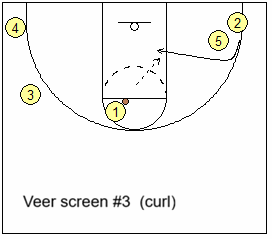
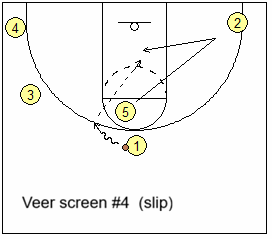
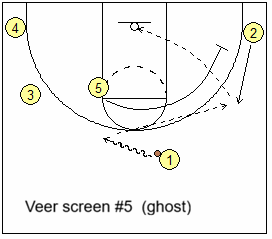
Diagram 5 above shows a ghost screen to Veer screen option. O5 sprints up but instead of making contact with the X1 defender, fakes ("ghosts") the screen, making no contact at all, and quickly sprinting to the Veer screen for O2. Again O2 either has the open outside shot, or a curl inside.
Combined Ram and Veer Actions
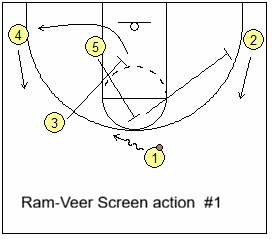
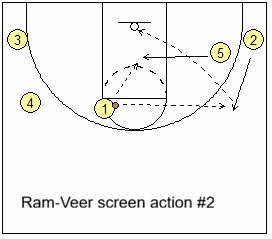
Good basketball offense often combines actions. Here we combine the Ram and Veer screen actions.Diagram 1 below shows O3 starting the action, setting a Ram screen for O5 inside. After screening, O3 cuts out to the left corner, as O4 lifts to the wing. Meanwhile, O5 sprints up to ball-screen for O1, and then Veer screens for O2, who cuts to the wing. O1 attacks around the ball-screen and could shoot or drive, or pass to shooter O2, or to O5 sealing and rolling inside after the Veer screen. A kick-out pass to either O3 or O4 are also options.
You can add a third action, the ghost screen. O3 Ram screens for O5, O5 ghost screens O1, and then Veer screens for O2.
In summary, Ram and Veer screen actions are ancillary actions that can help make other offensive actions work better (e.g. the pick and roll), and can help get your shooters open.
Related pages:
Want More Coaching Content?
Get access to more complete articles, diagrams, and coaching tools with Premium Membership.
View Membership Options


