
Basketball Fundamentals - Setting, Using and Reading Screens
By Dr. James Gels, From the Coach’s Clipboard Basketball Playbook"Helping coaches coach better..."
Disclosure: This page contains affiliate links, which means that Coach's Clipboard receives a small commission (at no cost to you) if you make a purchase using these links.

A screen or "pick" occurs when an offensive player attempts to block, or "screen", a defensive player away from the man he is guarding, thereby freeing up that offensive player for an open shot or pass. Setting good screens (or "picks") and reading the defenders' reactions are important offensive fundamentals.
It is often assumed that players will know how to do this, but like any important fundamental, it must be taught correctly. It's often believed that screens are most helpful against a man-to-man defense, and in out-of-bounds plays. But screening zone defenses works too (see "Screening Zones").
Setting good picks are basic to most offensive plays. Oftentimes, it is the screener that gets open (after sealing the defender). So setting a screen is a good way to get yourself open for a pass and shot. The "pick and roll" is still one of the simplest plays, but when done correctly, one of the most difficult to defend. The Utah Jazz's John Stockton and Karl Malone were masters of the pick and roll.
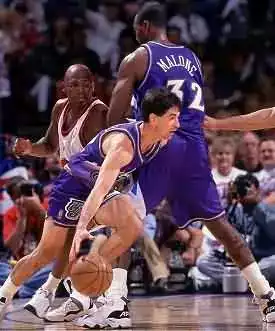
Stockton and Malone
Important elements in executing an effective screen.
1. The screener must make contact with (but not foul, hold or push) the defender that he/she is trying to block. If you do not make contact, the defender will simply slide around you.2. Be strong. Get your feet wide and plant your feet solidly. Once you have established your position, do not move your feet or lean your shoulder into the screened opponent or you will get called for a "moving/illegal screen" (an offensive foul). You must be stationary and not move with the defender, and you can't push the defender away. If a defender bumps into you and you are not stationary, you will probably be called for the foul.
3. Keep your arms tucked into your chest, not only to physically protect yourself, but also so the ref can see that you are not pushing with your hands, or grabbing or holding the defender.
4. The angle, or direction, of the pick and the timing of the pick are probably the most important, and most overlooked factors in setting a screen. You must have the correct angle, or position, when you set the pick.
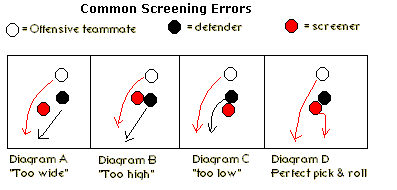
Anticipate the direction that your offensive teammate wants to go, and then make contact with his defender in a position so that you are directly in the way of the defender, and he/she cannot get around you. If you don't get the right angle, the defender will simply slide around you. See the diagram.
In Diagram A, the screener does not make contact, and the defender slips behind. In Diagram B, the screen is too high ( a common mistake), and the defender slides behind the pick and stays with his/her man. In Diagram C, the pick is too low, and the defender can fight over the screen. Diagram D shows a good pick, followed by the screener "rolling" to the hoop.
5. After your teammate cuts (or dribbles) around the screen, the screener "seals" off the screened defender and "rolls" (cuts) toward the hoop. The screener might seal with a reverse pivot and then cut to the hoop, or he might make a "rim run" cut (see the video below) by quickly stepping off the screen and opening up to the ball. In either case, if the defense switches the screen, the "roller" will usually be open for the pass.
6. The timing of the offensive player receiving the screen. The player receiving the screen must be patient and wait for the screen to arrive. Sometimes a player makes his cut too soon, just before the pick is "set", and the defender easily gets around it (because it never had a chance to be set). You must wait for the pick to be set, and then cut hard around it. Importantly, this player also must "set up the screen" by making a step toward the hoop first, and then cut back over the screen.
7. The offensive player receiving the screen must cut hard, and close to the screener. "Rub off" your teammate's screen - that is, brush against him as you go by. If you don't brush close to the screen, the defender might slip through the screen.
8. Options on an off-ball screen: (1) pass either to the cutter, or if the defense switches, (2) pass to the screener who could either roll to the basket or pop out to the 3-point arc ("pick and pop"). A third option (3) is for the screener to fake the screen (slip the screen) and quickly basket-cut for a pass and lay-up.
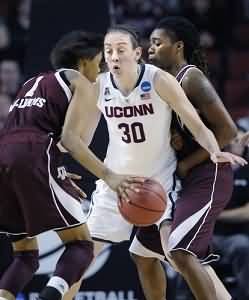
Setting a ball-screen
Types of Screens
Screens can be on-ball (when set for the ball-handler), or off-ball.1. Ball-screen:
The screener screens the defender guarding the ball, and then the pick and roll is run. See diagram E. O3 sets pick for O1.
2. Back-screen:
The screener sets the screen on the defender's "blind" side, or back side. Usually the screener is facing away from the basket. See the diagram. O4 back-screens for O2, who cuts back-door to the hoop. When setting the back-screen, the screener must allow a one-step gap between himself and the screened defender.
3. Down-screen:
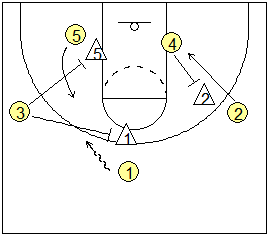
The screener sets this screen usually down low for a player either near the block, or for another perimeter player "lower" or closer to the baseline (like in 4-out or 5-out offense). The screener is usually facing the basket with his back to the ball. After screening, when making the "roll" move, he/she pivots facing the ball. See the diagram above. O3 down-screens for O5, who cuts around the screen for the pass from O1.
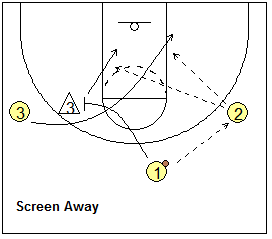
The cross-screen can occur either on the perimeter with one guard cross-screening laterally, or sideways, for another perimeter player. Or one post player can screen away (cross-screen) for another post player.
Looking at the diagram, if the cutter O3 basket-cuts, the screener pops out on the perimeter. If the cutter O3 cuts high on the 3-point arc, to O1's original spot at the top, the screener O1 should seal and slip the screen, looking for a quick pass from O2 on the cut to the basket.
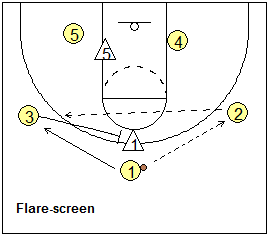
5. Flare-screen
This is really a type of back-screen set on the perimeter wherein the screener screens the back-side of the defender (away from the ball), and the cutter "flares" to the open spot on the perimeter for the skip pass and 3-point shot.
Screening Options - Reading the Defense
When setting a good screen, there are multiple options depending on how the defenders defend the cutter and screener. The diagrams below show all the options. We have a coach at the top with the ball, who passes to the cutter. You can use these as simple drills for teaching how to read the defender and and how to use the screen to your advantage.Lateral Down-screens
This is a down-screen set for a perimeter player. There are four options: curl, pop out, back-cut, and slip. The cutter and the screener must read the defense and choose the correct option.Curl over the screen. See diagram A. Here the defender chases over the screen, and O2 cuts hard over the screen for the pass and shot (diagram B).
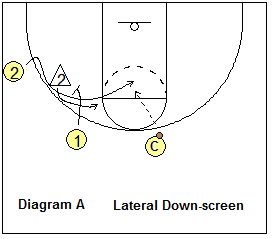
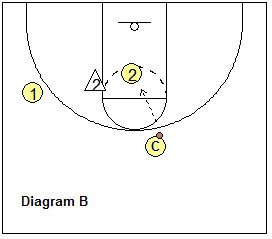
Cutter pops back and out. Diagram C shows the screened defender X2 stepping under the screen. O2 recognizes this, steps back and pops out to the arc for the pass and 3-point shot.
Cutter back-cuts. Diagram D shows the screened defender X2 overplaying the cut, and preventing him/her from going over the screen. O2 reads this and makes a quick back-cut to the hoop for the pass and lay-up.
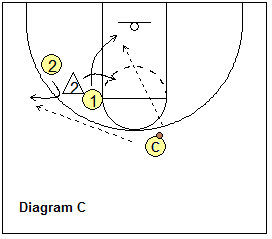
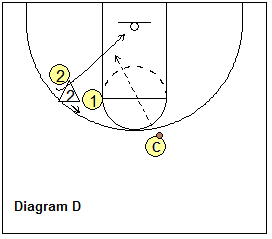
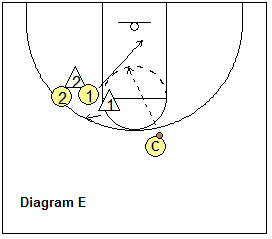
Screener slips the screen. Diagram E shows the screener's defender X1 jumping out ("hedging") over the screen and overplaying the cut. The screener O1 reads this, slips the screen, and makes a quick cut to the hoop for the pass and lay-up.
Inside Down-screens
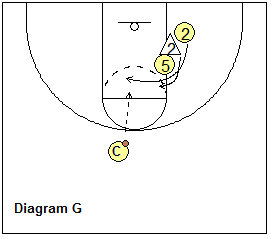
This is a down-screen set near the low block. Again, we have the same four options: curl, pop (or "flare"), back-cut, and slip. The cutter and the screener read the defense and choose the correct option. Diagram F shows the down-screen with our high-post player screening down for our shooter O2, and coach has the ball at the top.Curl over the screen. See diagram G. Here the defender chases over the screen, and O2 curl-cuts hard over the screen for the pass and shot.
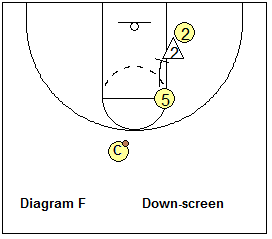
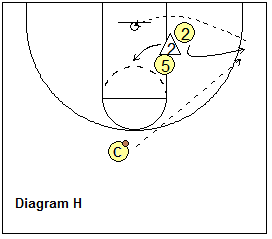
Cutter pops - flares toward the corner. Diagram H shows the screened defender X2 stepping under the screen. O2 sees this and pops out (flares) toward the corner for the pass and shot.
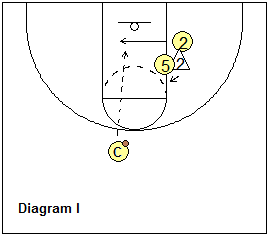
Cutter back-cuts. Diagram I shows the screened defender X2 overplaying the cut, denying O2 and preventing him/her from going over the screen. O2 reads this and makes a quick back-cut for the pass and lay-up.
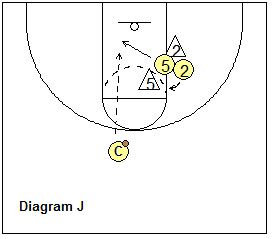
Screener slips the screen. Diagram J shows the screener's defender X5 jumping out over the screen and overplaying the cutter O2. The screener O5 reads this, slips the screen, and makes a quick cut to the hoop for the pass and lay-up.
Back-screens
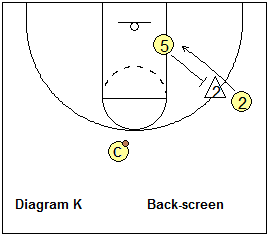
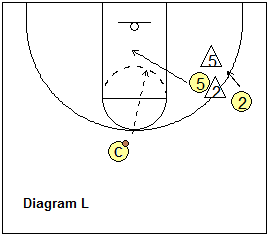
Back-cut. Here O5 back-screens for O2 (diagram K). O2 back-cuts around the screen for a pass and lay-up. After screening, O5 pops out to the arc and could also get the pass.Slip option. If the X5 defender switches on O2, the screener O5 reads this, seals X2, and slips the screen for a pass inside and a lay-up.
The back-screen is often a great way to get defensive mis-matches in the low post, or on the perimeter.
Flare-screens
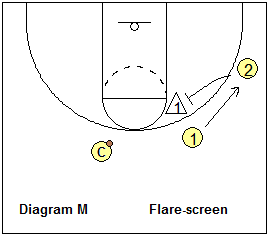
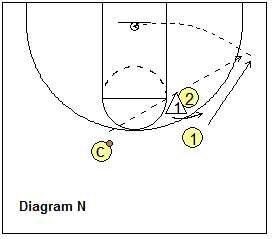
A flare-screen (diagram M) is really a back-screen set by one perimeter player for another with the cutter going away from the ball.Cutter goes over the screen. See diagram N. Here the defender is caught by the screen, and O2 cuts hard over the screen for the pass and 3-point shot.
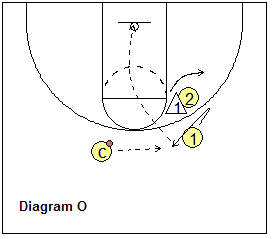
Cutter steps back and pops. Diagram O shows the screened defender X2 stepping under the screen. O2 sees this, steps back and pops out for the pass and shot.
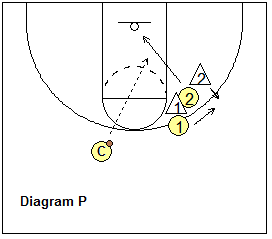
Screener slips the screen. Diagram P shows the screener's defender X2 jumping out over the screen and overplaying the cutter O1. The screener O2 reads this, slips the screen, and makes a quick cut to the hoop for the pass and lay-up.
Floppy screens
A floppy is simply a screen set for a perimeter player near the baseline, usually used to get your best shooter(s) open. Diagram 1 shows that two-screeners are near the right block (and just above) so as to set a staggered screen. On the left side of lane is another screener. O2 begins right under the basket and cuts either right or left around the screen for the pass from O1 and a possible shot. That basically is the "floppy" action. O3 cuts in the opposite direction of O2.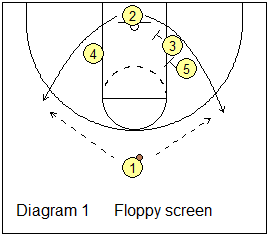
Ghost screens
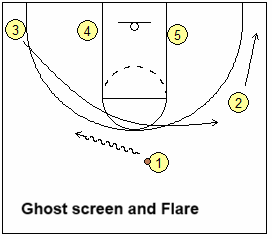
Simply, a ghost screen is a faked ball-screen where the screener does not actually make contact with the defensive player, but instead sprints away at the last second to an open spot. This usually results in good perimeter spacing by stretching the defense and often either (1) opens a driving lane for the ball-handler, or (2) creates an open shot for the screener (if his defender helps on the ball-handler).Here is a ghost screen with a flare cut to an open spot on the arc. O3 ghost screens and flares to the right wing for the pass from O1, and the 3-point shot.
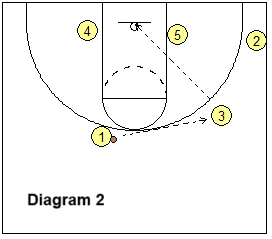
There are also ghost screens with dribble-drive and slip options, multiple ghost screens, ghost screens combined with other actions, and ghost screens used in transition. See "Ghost Screens and Actions" for details.
"Spain" Pick and Roll
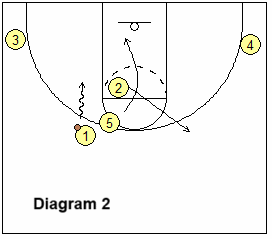
The Spain pick and roll action involves three players with a high pick and roll set at the middle of the floor by a post player, who then also receives a back-screen from a guard - a "screen the screener" action. The other two players occupy the corners. See "Spain" Pick and Roll play.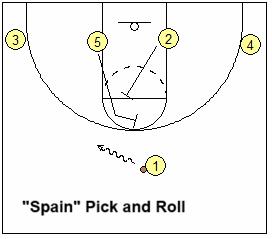
"Screen your own"
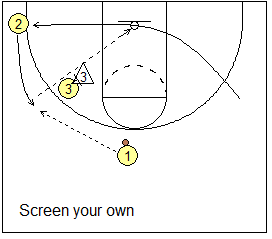
Instead of screening another player's defender, you screen your own man. This allows a teammate to cut behind your screen for a perimeter pass and open 3-point shot.In the diagram, O2 has cut through. If O3 screens O2's defender, the defenders will switch and neither will be open. Instead, O3 screens his own defender X3. O2 cuts up for the pass and 3-point shot.
"Cut-Screen"
Coach Bob McKillop (see video below) uses the term cut-screen, but in reality there is no actual screen. It's more of a cutting through and clearing action that frees up a teammate - but it has the effect of a screen in creating an opening.In the diagram, O1 dribbles toward O2, and O2 back-cuts through to the opposite corner, taking X2 with him. On this inside cut, the X4 defender usually takes a step toward O2 cutting inside, denying the cutter. This cut and the defender's helping action frees up O4 for a cut to the top, which is usually wide open for the pass from O1 and a shot.
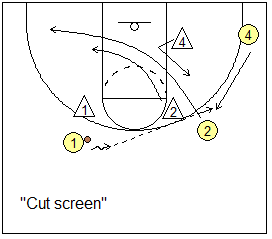
from Davidson College Head Coach Bob McKillop's "5 & 4 Out Offensive System"


